Last Update: December 15, 2015 |
Dialog Help
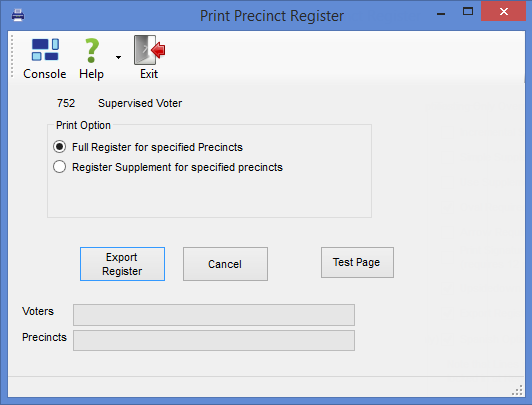
To access: ELECTIONS > Print Registers
Note Before printing a precinct register or exporting the register to a file, you should check the relevant system options and verify they are properly set. See VOTER FOCUS ADMIN > System Options > Prec Reg/Elctns.
From the Print Precinct Register dialog, you can:
Print the full precinct register for all precincts or up to 10 selected precincts. To print for all precincts, leave the Places Selected field empty when selecting precincts.
Export the full precinct register for all precincts to a text file for delivery to an outside printing vendor.
Print precinct register supplements.
Print replacement pages for a precinct-register book beginning at a specified page.
Print a test page of the precinct register.
Fields and Controls on this Dialog
Print Option
Full Register for Specified Precincts—Select this option when you want to:
Print the full precinct register for selected (or all) precincts. After selecting this option, click Print Register to select the precincts for printing and the printer(s) where the books will print.
Export the precinct registers for all precincts to a text file that can be sent to your printing vendor. After selecting this option, click Export Register to specify the location for the text file.
Register Supplement for Specified Precincts—Select this option when you want to print precinct register supplement pages. You can do this for one or more precincts. You can limit the changes in the supplement to those made since a previous supplement was printed by selecting the date of the previous supplement in the Print On and After field. Leave the field blank to print all changes to the register.
Print Full Register for One Precinct with Starting Page or Page Range—(This option does not appear when the option Export Precinct Register for Outside Printing in Voter Focus Admin is selected.) Select this option when you want to print replacement pages for a precinct-register book. You will need to select the precinct and book number from the drop-down lists. If you don't want to print the entire book, specify a page range in the Start and End Page fields.
Print Register/Export Register/Print Pages—The label on this button depends on the setting of the option Export Precinct Register for Outside Printing in Voter Focus Admin and the print options selected on the current dialog.
Print Register initiates precinct selection (if applicable) and printing of the precinct register, supplement, or replacement pages.
Export Register is used to create a text file of the precinct register for delivery to an outside printing vendor. Clicking this button brings up a Windows dialog where you can specify the name of the export file and its location on your network.
Print Pages is the label when the print option Print Full Register for One Precinct with Starting Page or Page Range is selected. It initiates printing of replacement pages in a register book.
Test Page—Lets you to quickly verify that the printer is set up to print a precinct register. The test-page feature prints one page of a 12-line register and one page of an 18-line register.
Supplement Options/Print On and After—This box appears when you select the option Register Supplement for Specified Precincts. If you have printed supplements prior to this one and have entered the changes from those supplements into the register, you can select the date of the most recently applied supplement as a starting date for the changes in the supplement you are printing now. This date is selected in the Print On and After field; leave the field blank to print all changes to the register. If you are printing the last of the supplement pages for the precinct(s), select Is this the final supplement run?. This will include the printing of Additions pages that show voters who have moved into the precinct since the precinct register was first generated.
Starting Page Parameters—This box appears when you select the option Print Full Register for One Precinct with Starting Page or Page Range, which lets you print replacement pages. You will need to enter the precinct, book number, and a starting page number before clicking Print Pages. To print a range of pages, enter the ending page number in the End Page field. To print the entire book, enter 1 in the Start field and leave the End Page field blank.
Note The Voters and Precincts bars at the bottom of the dialog show the progress of the register-printing run.