Example
What Are They?
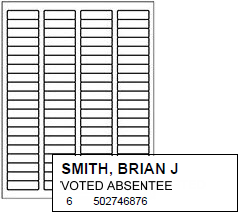
Page-printer sheets of labels showing changes to individual voter eligibility due to their having voted prior to election day or had their eligibility challenged. A label is produced for each voter:
To whom a mail ballot has been delivered, including pickup absentees
Who voted by mail, including in-office absentees
Who early voted
Who voted by provisional ballot
Whose eligibility has been challenged and must therefore vote provisionally
Supplement labels are printed to the page printer the user selects at run time.
Size
1/2 x 1-3/4"
Formatted for Avery 5267 labels (4-up, 80 labels per sheet).
Contents
Voter name
Voting status
Precinct ID and voter registration ID
The content of supplement labels is hardcoded in the system and cannot be changed by users.
How to Print
ELECTIONS > Maintain Election Settings > Register Generation > Create Register Supplement
Setup
Select VOTER FOCUS ADMIN > System Options > Prec Reg/Elctns > Precinct Register Options > Use Supplement Labels.
Make adjustments to top and left page margins:
VOTER FOCUS ADMIN > System Options > Avery Label Margins > Margins for Vote-by-Mail Labels > Avery Label Number 5167
In our testing at VR Systems, we have found these margins work well:
Top: -1.0
Left: 1.75
User Permissions
RegisterGeneration
Related Topics
How to Produce Supplements to Precinct Registers